Scaling Specimen Transport Visibility Without Increasing Operational Overhead

Most healthcare cold-chain teams don’t struggle to capture temperature data.
They struggle to prove control consistently—across sites, shifts, and exceptions—without turning every review into manual work.
That’s the real business problem with audit trails:
- Manual logs don’t scale as volume grows
- Reviews happen inconsistently (“when we get time”)
- Records are hard to defend when versions and edits aren’t tracked
- Exceptions turn into long investigations because the evidence trail is incomplete
So audit readiness becomes a “panic event” instead of a byproduct of daily operations.
This is exactly what 21 CFR Part 11 is designed to prevent when electronic records replace paper: it calls for secure, computer-generated, time-stamped audit trails that record entries/actions that create, modify, or delete records—and ensures changes don’t obscure prior information.
Audit Trail: An audit trail isn’t compliance paperwork. It’s the mechanism that turns monitoring into defensible proof-of-performance—every day, not just during audits.
Why manual logs break at scale (and how that shows up in ROI)
Manual or semi-manual logging creates three kinds of operational loss:
1) Investigation labor
When something goes wrong, teams rebuild the story across screenshots, emails, and spreadsheets. That time compounds across escalations.
2) Decision delays
Acceptance/release decisions slow down when you can’t trust the record history (what changed, who changed it, when).
3) Repeat incidents
If exception closure isn’t standardized (review to sign-off to CAPA), the same failure modes return—because “learning” never becomes an operational control.
That’s why the best operators move from “logging temperatures” to “running a controlled workflow.”
What “audit trails by design” actually means
A compliant audit trail isn’t just a report you export later. It’s a system behavior:
- Every critical event is time-stamped automatically
- Record changes are tracked without overwriting history
- User access is controlled by role
- Reviews and approvals are captured as part of the process
This aligns with the core Part 11 audit trail expectation: secure, computer-generated, time-stamped audit trails that record actions that create/modify/delete records, retain history, and remain available for review.
Important: FDA guidance on Part 11 scope emphasizes that compliance is not just a feature—it’s how you apply electronic records in regulated activities.
The daily workflow that makes audit trails “automatic”
Here’s a practical workflow cold-chain leaders can operationalize without slowing routes.
Step 1: Define what counts as a “regulated record” in your operation
Not every data point needs a sign-off. But some events should always create a formal record:
- Temperature excursions beyond your acceptance criteria
- Custody handoff confirmation points (where applicable)
- Receipt checks/acceptance decisions
- CAPA closure and effectiveness checks
Step 2: Configure alerts and thresholds that drive action—not noise
Alert fatigue kills compliance because people stop reviewing. Map thresholds to what’s operationally actionable.
Step 3: Standardize a “Review to Sign-off to Close” routine
Make it habitual and lightweight:
- Daily: review exceptions and sign-off on critical events
- Weekly: trend review (repeat routes, repeat sites, repeat root causes)
- Monthly/Quarterly: governance check (device status, calibration schedule, access controls)
Step 4: Attach the resolution record to the event (not to email)
When an excursion happens, the audit trail should capture:
- who reviewed it
- what decision was made (accept/hold/reject)
- what corrective/preventive action was initiated
- when it was closed and by whom
This is how you stop “proof” from being scattered.
Step 5: Treat “Part 11 compliant” as a system and process outcome
A useful rule of thumb: platforms can be “Part 11 capable/ready”, but actual compliance depends on procedures, validation, roles, and execution—not just software features.
What to look for in a software platform
If you’re evaluating systems for audit trails, here’s the practical checklist operators should care about:
Audit trail integrity
- Secure, time-stamped record of key actions (create/modify/delete)
- History preserved (no overwriting prior records)
Accountability controls
- Role-based access controls
- Reviewer identity captured
- E-signature/sign-off capability where needed
Exportable evidence
- Consistent reports for excursions, reviews, and closures
- records retrievable quickly for audits and customer escalations
Operational fit
- Low-friction review workflow
- Exceptions are easy to classify, assign, close
- Scalable across multiple sites and routes
Built-in compliance that reduces daily work
Akuratemp’s approach is to make compliance the value-added byproduct of better operations.
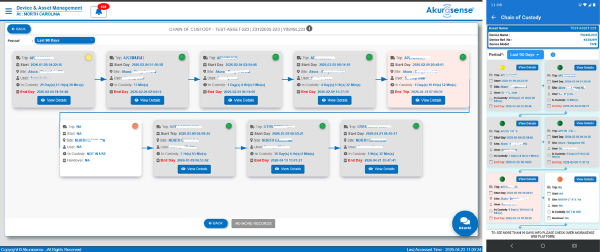
Akurasense® as the “proof layer”
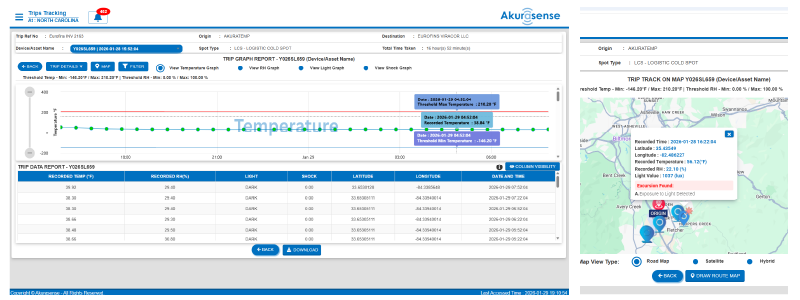
Akurasense ties monitoring and reporting to audit-trail behaviors:
- Time-stamped events and records
- Consistent reporting for excursions and outcomes
- Structured evidence that’s easier to review and defend
When this is embedded into daily workflows, teams reduce:
- Manual logging effort
- Investigation time
- Inconsistency across sites and shifts
…and gain faster exception closure and more defensible proof.
Request an “Audit-Trail Readiness” audit
If audit readiness still feels like a scramble—or your records aren’t consistent across sites—request an audit. We’ll review your current temperature logging, exception handling, sign-off process, and evidence retrieval flow, then deliver a practical action plan to make audit trails a daily workflow (not a panic event) using Akurasense-enabled monitoring and reporting.